
Free project management template
Free Construction RFI Log template.
Keep questions and answers traceable. Record exactly what needs clarification, who must respond, and when that answer is needed to keep work moving.
Download free Excel templateExcel (.xlsx). Blank template and worked example. No email or account required.
See the worked example
The download includes this example and a blank copy. All example project details are fictional.
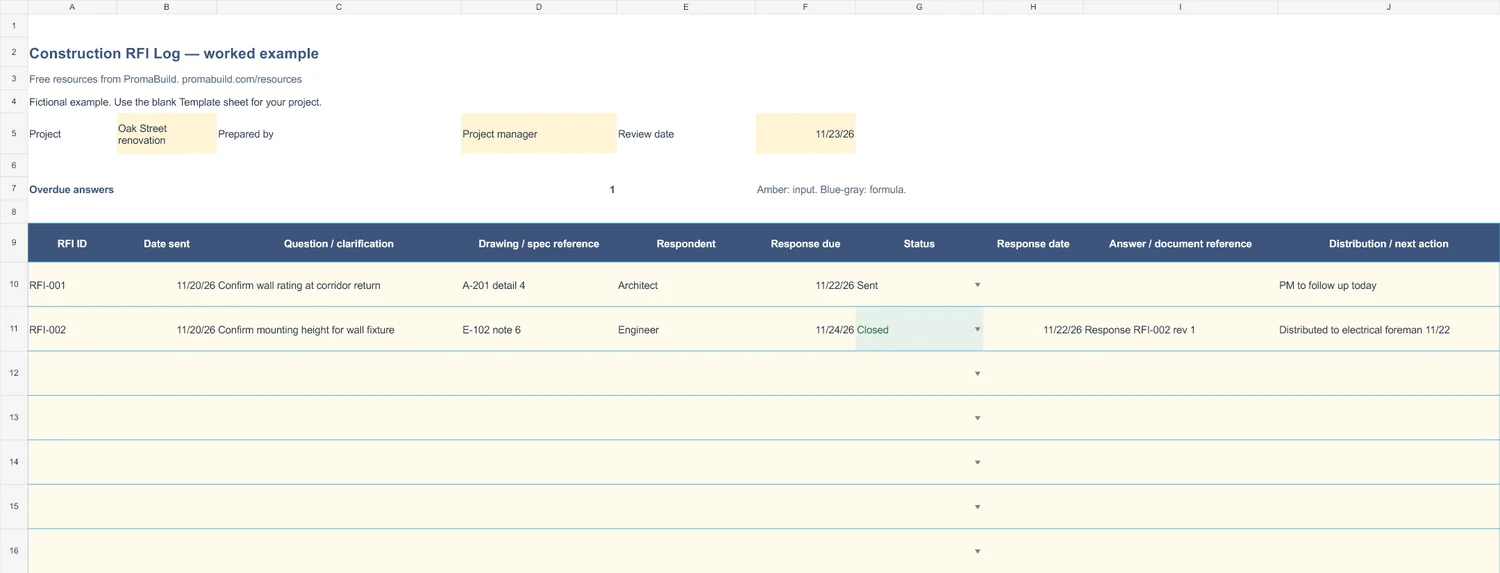
Select the preview to open the larger image.
How to use it
- Enter a review date. Assign one RFI ID per question and identify the drawing or specification involved.
- Record the date sent, respondent, and required response date. Keep the question specific enough to answer.
- Record the response date and answer reference. Distribute the answer to affected trades before marking the RFI Closed.
An RFI answer may lead to a scope or cost change. Link that change to the change order log and obtain the required approval separately.
The workbook has 30 prepared rows. For longer logs, add rows inside the Excel table, copy any formula cells, and extend the summary ranges to include them.
Fields in the template
- RFI ID
- Date sent
- Question / clarification
- Drawing / spec reference
- Respondent
- Response due
- Status
- Response date
- Answer / document reference
- Distribution / next action
Ready to keep the whole job together?
Use these templates for your current process. When you need a shared project workspace, explore PromaBuild Pro and Partner for construction project management and AI.
These downloads are free. Pro and Partner are paid plans. The Free account does not include project management or AI.
Use it with
Change order log
Track proposed and approved construction changes, quoted costs, schedule impacts, and written approvals in a free Excel change order log.
Submittal log
Track construction submittals, revisions, reviewer responses, required-on-site dates, and procurement actions in a free Excel submittal log.
Meeting minutes
Record construction meeting decisions, action owners, deadlines, and follow-ups in a free Excel meeting minutes template.