
Free project management template
Free Construction Punch List template.
Turn the walkthrough into an actionable list. Identify the location, describe the correction, assign an owner, and verify the completed work before closing an item.
Download free Excel templateExcel (.xlsx). Blank template and worked example. No email or account required.
See the worked example
The download includes this example and a blank copy. All example project details are fictional.
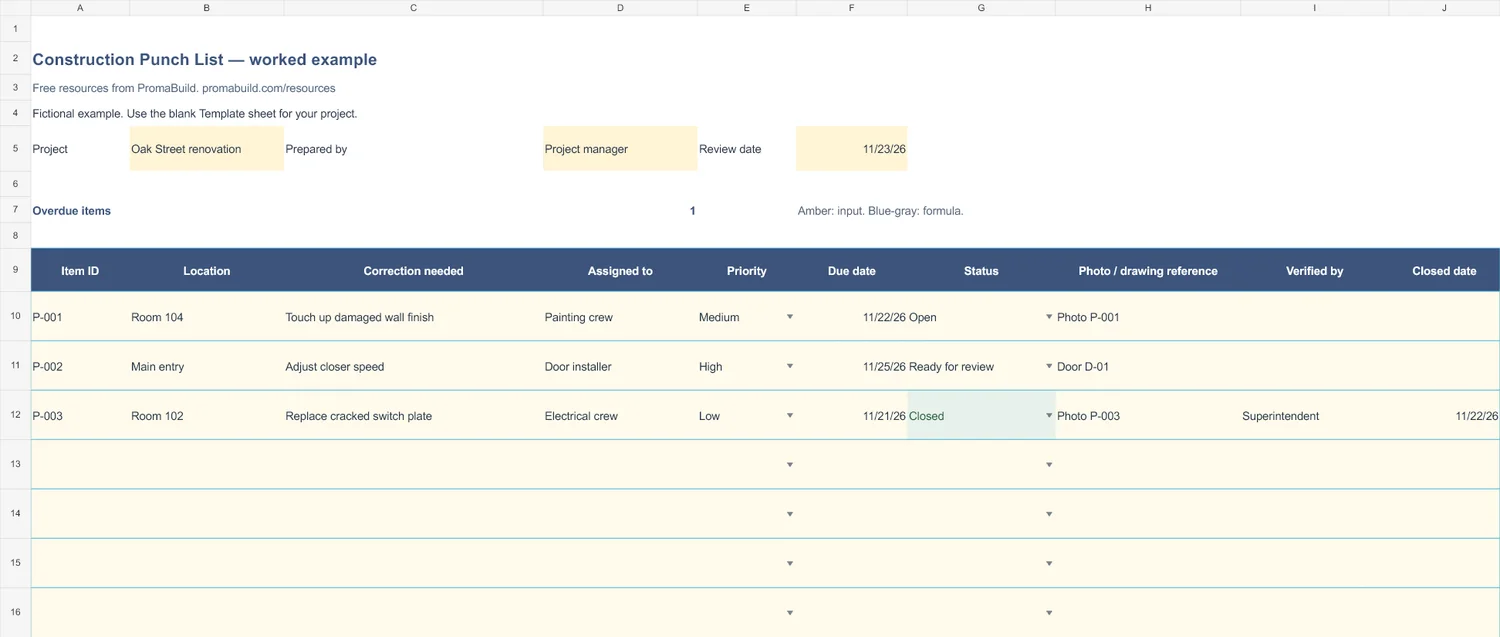
Select the preview to open the larger image.
How to use it
- Enter a review date so the overdue count uses the same date as your walkthrough.
- Give each item a unique ID, location, owner, priority, and due date. Add a photo or drawing reference.
- Use Ready for review after correction. Mark Closed only after the named reviewer verifies the work and records the closed date.
An item reported complete still needs verification. Keep it Ready for review until the reviewer accepts the correction.
The workbook has 30 prepared rows. For longer logs, add rows inside the Excel table, copy any formula cells, and extend the summary ranges to include them.
Fields in the template
- Item ID
- Location
- Correction needed
- Assigned to
- Priority
- Due date
- Status
- Photo / drawing reference
- Verified by
- Closed date
Ready to keep the whole job together?
Use these templates for your current process. When you need a shared project workspace, explore PromaBuild Pro and Partner for construction project management and AI.
These downloads are free. Pro and Partner are paid plans. The Free account does not include project management or AI.
Use it with
Daily site report
Record daily site activity, crew hours, progress, deliveries, and issues in a free Excel construction daily report.
Meeting minutes
Record construction meeting decisions, action owners, deadlines, and follow-ups in a free Excel meeting minutes template.
Weekly progress report
Share construction progress, next-week work, risks, and decisions needed with a free Excel weekly progress report template.